Screen Time Policies in Schools: How Districts Are Reducing Screen Time Without Sacrificing Learning
After years of racing to put a device in every student’s hands, school districts are hitting the brakes. The one-to-one push that took off during the pandemic has run into real resistance with parents, educators, and lawmakers all asking the same question: are digital resources helping students, or just wearing them out?
If you’re an educator, you’re caught in the middle. You know that the concern about too much screen time is valid, and you know that teachers get real results from the digital tools they count on. You also know that there’s a balance to strike: protecting students without tossing out the tools that actually help them grow. That balance is exactly what this article is about.
Main Takeaways
- Districts and teachers are reassessing digital tools to determine if they truly deserve classroom time.
- Leaders are looking beyond usage data and requiring proof that resources improve student learning.
- A four-part rubric can help educators identify tools worth using in the classroom.
- The strongest districts are balancing screen time concerns with technology that delivers measurable results.
Why Screen Time Policies in Schools Are Changing Right Now
For most of the last decade, adding technology felt like doing right by students, and for good reasons. Millions of kids lacked a computer or internet at home, a pandemic forced classrooms online overnight, and Congress gave districts billions of dollars in ESSER funds to help close the gap in a short amount of time.
Leaders were not being careless. They were addressing major issues: equity, access, engagement, and preparing kids for a digital economy.
The harder question, the one coming into focus now, is whether all those new digital resources improved student learning, or whether the buying outpaced the evidence.
That question is showing up in policy. State legislatures are passing laws that limit classroom screen time, and districts are setting their own caps.
Los Angeles Unified is a good example. It has adopted some of the country’s strictest school screen-time guidelines:
- Early Education – 1st Grade: No routine screen time
- Grades 2 – 3: 20 minutes per day or 100 minutes per week
- Grades 4 – 5: 30 minutes/day or 150 minutes/week
- Grades 6 – 8: 60 minutes/course/day or 400 minutes/week
- Grades 9 – 12: 120 minutes/course/day or 600 minutes/week
The movement extends beyond Los Angeles: as of May 2026, lawmakers in at least 14 states had proposed school screen-time legislation.
Policies like these are here to stay, so districts and teachers need a repeatable way to judge which tools earn their place. That’s where a simple test helps.
A Simple Rubric for Evaluating Edtech Under Screen Time Limits
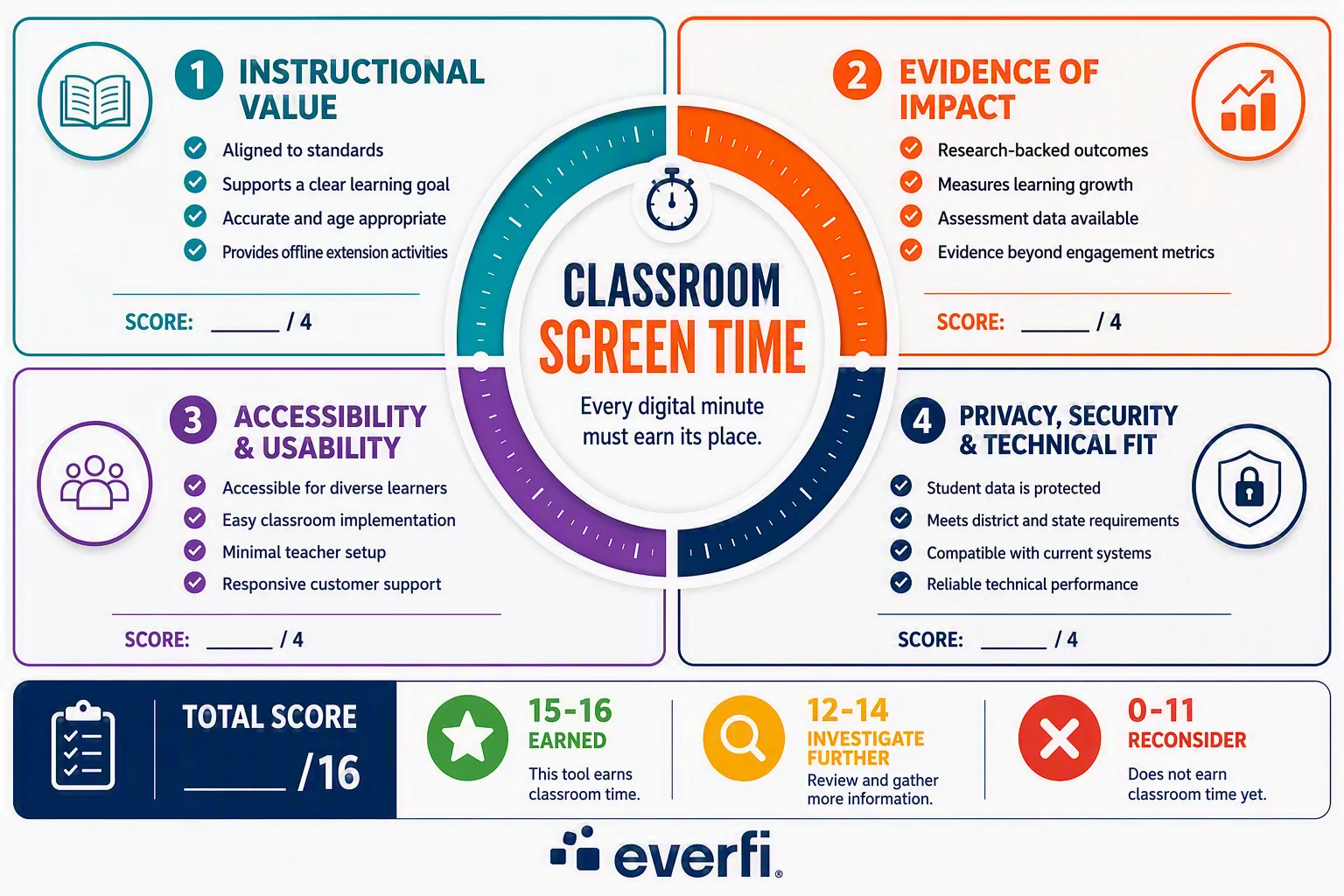
When minutes are limited, every tool must earn its place.
We’ve analyzed the evaluation rubrics of multiple states and national educational organizations and blended the most used criteria into a four-part test. It gives administrators and teachers a quick way to determine whether a digital resource is worthy of classroom time.
- Instructional Value and Content Quality
Start with the simplest question: is this tool clearly aligned to standards, or is it just keeping students busy?
A resource should connect to a clear learning goal, align to your state standards, and hold up as accurate and age-appropriate. Bonus points if it provides teachers with offline extension activities that let them dive deeper into a topic without using screen time.
If it is engaging but not tied to real content, it is filling time, not earning it.
Each of Everfi’s free life skills lessons is aligned with state and national standards. Want to see for yourself? Use this interactive tool to see which of your state’s standards Everfi’s high school financial literacy resource covers. While you’re there, explore the offline resources that Everfi provides teachers to extend the learning.
- Evidence of Impact
Does the digital tool provide clear evidence of positive student outcomes?
Look for measurable outcomes: pre- and post-assessment data, learning gains, and research that shows students actually walk away knowing more than they did before.
Logins and click counts don’t count. They only tell you a resource is being used, not that it’s effective.
Everfi’s resources are backed by research that proves educational impact. Teachers can see that on the classroom level in their teacher dashboards. Administrators can assess the impact of Everfi’s resources on their district’s students via Impact Reports.
- Accessibility and Usability
Can teachers and students easily use it?
A tool only helps if every student can use it and every teacher can run it. That means it works for multilingual learners and students with different needs, and it fits into a normal classroom without heavy prep or a long setup.
The harder it is to use, the less likely it is to get used well.
Teachers love that Everfi’s resources come in a variety of languages. They also love that they can create their Everfi account and implement a lesson in under 15 minutes. No heavy prep or long setup. And if they (or their students) have any questions, an Everfi representative is easy to reach.
- Privacy, Security, and Technical Fit
Does the resource meet district requirements for privacy, security, and systems?
Finally, make sure the tool is safe and practical. It should protect student data, meet your state’s privacy requirements, and connect cleanly with the systems and devices you already have.
A great lesson is not worth much if it puts student information at risk or will not load on your hardware.
For over 15 years, Everfi’s platform has met the privacy and security requirements of districts of every size, and it’s always free thanks to Everfi’s partner network.
The Decision Rule
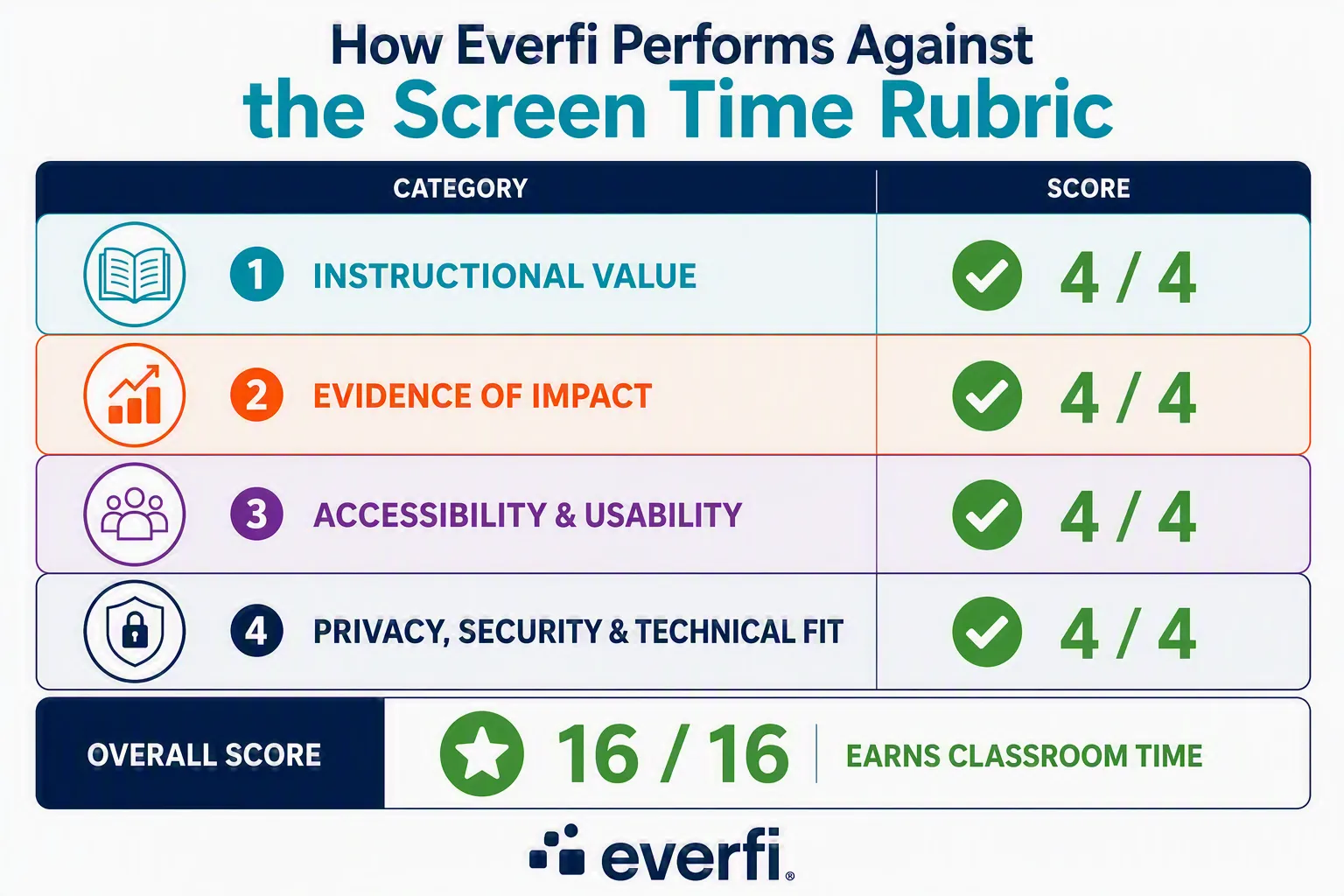
Here is the easy part: If a resource clears all four, it has earned its place in the classroom, even under tight screen time limits.
If it stumbles on one, that’s your signal to ask more questions before you commit minutes to it.
This is exactly the lens Everfi’s life skills resources are built to pass. In the next section, we’ll examine how two districts are tackling the screen time question.
How Districts Are Balancing Screen Time Right Now
Let’s take a look at how real districts are addressing the call for less screen time. Each one is approaching it a little differently, but they share the same goal of giving students the most impactful education possible.
Atlanta Public Schools: Fitting the Tool to the Limit
Atlanta Public Schools already prohibits personal electronic devices (such as cell phones) during the school day as outlined by Georgia’s policy. So, it’s not a surprise that APS is currently in the process of piloting a screen time policy and teachers outside the pilot are asking tough questions to ensure their digital resources are worth the minutes.
When Everfi led a recent teacher training in Atlanta, educators came in with real concerns about the district’s screen time limits. It didn’t take long, however, for the mood to shift as they learned that the majority of Everfi’s lessons are only 10-20 minutes in length, small enough to fit a full lesson into their limits and still have time left over.
APS teachers were also excited that Everfi provides educators with a large library of offline extension activities that allow students to keep exploring without spending more time on a screen.
Miami-Dade County: Measuring Before Deciding
Miami-Dade County Public Schools did something a bit different. Before setting limits, the district studied how much time students were actually spending on devices, then set a working target of around 90 minutes a week for K-8. Just as important, they tied tool usage back to student performance, so nobody’s guessing if it’s effective.
The nation’s third-largest school district has been using Everfi’s data-backed resources for years. With almost 100,000 student enrollments last year, the district is able to easily see the impact Everfi’s resources have on student learning, attitudes, and behaviors.
“Everfi is the digital learning experience. It connects education with real-life experience.” – Ebony Davis – Curriculum Support Specialist, MDCPS, FL
The message is the same in both examples: screen time limits are about being intentional in the use of classroom technology.
It’s no accident that Everfi comes up in both stories. It easily checks all four boxes of the rubric you’d apply to anything else.
- The lessons align to state standards and curriculum units, so the age-appropriate content is tied to real learning goals rather than filler.
- The impact is measurable with real-time pre- and post-assessment data for teachers and district-wide data for administrators. (For example, LAUSD high school students who completed Everfi – Financial Literacy averaged a 40-point increase in learning gains.)
- Everfi lessons meet recognized accessibility standards and districts are provided with a dedicated Everfi Lead to support rollout and implementation. Teachers need minimal prep to run the lessons that typically last between 10 to 20 minutes and pair with offline activities that allow teachers to extend the learning without the screen.
- On privacy and technical fit, Everfi runs on an established platform that districts of every size already trust.
Used in more than 8,000 districts, Everfi’s lesson platform is an excellent example of what balanced instructional resources look like.
Rethinking Screen Time Does Not Mean Removing What Works
Screen time policies in schools will soon be the new normal, and that’s not a bad thing. Used well, they push all of us to be more intentional about the technology students spend their time on.
The goal is to ensure that the digital tools teachers use deserve the classroom time.
The next time you’re evaluating a new tool, run it through the four questions. If it is valuable, proven, easy to use, and safe, it’s worth a pilot.
If you would like to see how Everfi’s resources fit within your district’s screen time policy, schedule a call with your district’s Everfi Lead.
Let’s find the balance that works for your district.

From the military to the classroom, Mike Oliver’s path has been shaped by service. At Everfi, he works to bring the free financial literacy resources that made a difference in his own classroom to students across the country. Connect with Mike on LinkedIn.
AI assisted with preliminary research and content development. Final editorial decisions, fact verification, and revisions were completed by the author.
Free for All School Districts
Thanks to partners, we provide our digital platform, training, and support at no cost.
See why 3 out of 5 districts partner with Everfi.